Back
HCIdea

HCIdea

A UX ideation and research hub designed to help Human-Centered Design students overcome decision paralysis.

Project Overview

Our project's primary audience is Human-Centered Design (HCD) students, addressing some of the difficulty that comes with generating an idea and choosing topics for projects. The goal of this project was to design a digital platform that reduces decision paralysis and aids students in choosing feasible and relevant research topics.

Research was conducted with current and former HCD students to gain a better understanding of the experience and identify areas of improvement through design. After sending out a survey and conducting interviews to gain insights, we performed qualitative analysis on responses and built a solution. Once the prototype was built, we tested on users for feedback, implemented changes, and created this report.

Team: Andrew Dinspechin, Lindsey Fortier, Apoorv Singh | Course: Intro to UX | Date: December 17, 2025

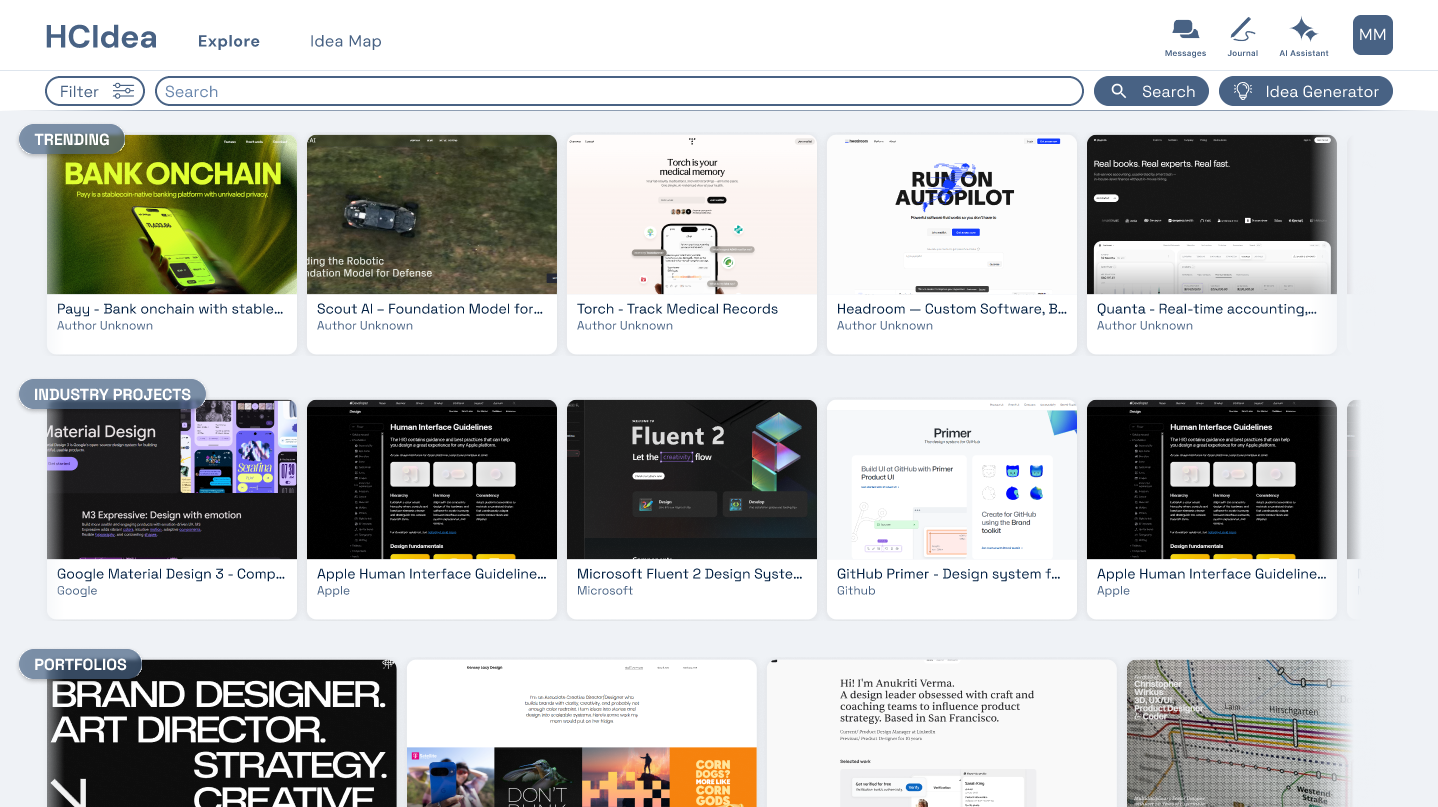
HCIdea Platform Overview

Problem Statement

With HCD students being early in their design journey, many often struggle to identify research topics for assignments and group projects. Throughout the course of the degree, it is often a class requirement to generate ideas for research and work in teams. Since students are just starting to learn the principles of design, it can be difficult to know where to start or how to build a strong foundation.

Key challenges identified:

  • Many common problems already have existing solutions, making it harder to generate truly novel ideas
  • Problem spaces have 'shrunk', becoming more nuanced and increasingly difficult to ideate for
  • Students typically aim to secure roles in industry or continue into academic research
  • Building strong portfolios, developing versatile skill sets, and forming professional connections are key factors for success

The uncertainty around project direction can cause indecision and frustration, leading to inefficient time management early in the process. With regard to group projects, these challenges are often amplified when trying to attain consensus on a project's direction, demonstrating a clear need for an organized ideation system.

Proposed Solution

We proposed a digital platform, titled 'HCIdea', designed to help HCD students discover and refine research topics for academic and portfolio projects. The platform serves as both an idea generator and research library, aggregating existing publications, case studies, and design examples based on the user's interests or team focus.

Key platform features:

  • Idea Generation Hub: Browse existing design examples, industry-sponsored projects, and personalized content recommendations with built-in prompts for brainstorming sessions
  • Research Analysis & Aggregation: AI-powered synthesis of complex information, creating connection points between related research with centralized idea maps
  • UX Project Guidance: AI assistant that helps assess feasibility and novelty of research ideas, identify technical constraints, and provide brainstorming support
  • Community Connection: Student profiles highlighting research interests to foster peer-to-peer networking and simplify finding compatible project partners
  • Search & Categorization: Smart search tools that filter by industry trends, tags, and personal interests, surfacing different types of data in an intuitive format

By presenting related design solutions, the system assists in highlighting gaps in under-researched opportunities, helping students identify areas with potential for meaningful exploration.

User Research

We conducted user research to better understand the needs of design students during the ideation and discovery phase of their projects. To build empathy and understand users better, we distributed a survey and conducted user interviews.

Methodology:

  • Survey: Distributed a mixed-methods survey of 11 questions to establish baseline understanding of HCD students, capturing challenges with product ideation, gaps in UX knowledge, and potential issues when forming teams
  • User Interviews: Conducted 20-minute unstructured interviews to gain deeper insight into students' thought processes in the context of ideation, understanding pain points, needs, wants, and motivations in more depth

Participant criteria included current and former students in HCD, Human-Computer Interaction (HCI), User Experience Design (UX), or related fields, as well as individuals who have worked on assignments requiring project idea generation either individually or in teams.

Survey Demographics

  • 77.78% of participants were current or former HCD students
  • 9 survey participants total
  • 5 follow-up user interviews conducted

Key Insights

Our analysis revealed several critical insights about HCD students' ideation challenges:

Idea Generation and Novelty: 77.78% of participants were neutral or found it easy to come up with an idea for a project. However, generating ideas that are truly novel proved more difficult with 77.78% reporting that coming up with something new or original is 'somewhat' or 'very' challenging. This highlights a common struggle to create ideas that feel distinctive in a saturated problem space.

Uncertainty Around Feasibility and Direction: Time constraints and project feasibility were identified as some of the most common problems when generating ideas. Students often struggle to estimate the scope of projects within a semester, making it difficult to manage their time effectively.

Gaps in UX Knowledge and Process Understanding: With many students being early in their design career, understanding design principles and terminology is a common challenge with 88.89% reporting difficulty in this area. 77.78% participants noted the importance of considering their portfolio when selecting an idea, suggesting students understand the value but may not understand the principles needed to achieve it.

Desire for Tools to Support Research and Ideation: Participants expressed strong interest in AI-powered tools to automate research and ideation. Students currently use a variety of platforms: Google for research, Quora for perspectives, ChatGPT for brainstorming, Behance for inspiration, Miro for collaboration, and Figma for prototyping - highlighting an opportunity to streamline these functions.

Teamwork and Collaboration Challenges: 66.67% participants reported difficulty finding fellow researchers or designers to work with. Indecision, lack of communication, and differences in personal interest were ranked highest among sources of friction between teammates.
User Personas

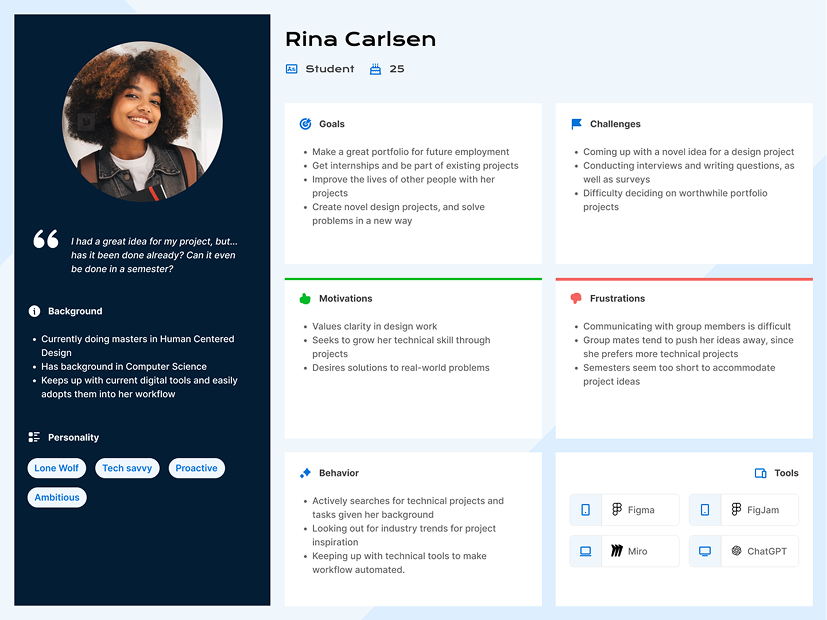
Based on our research insights, we developed two primary user personas to guide our design decisions.

User Persona 1 - The Ambitious Student
User Persona 2 - The Collaborative Learner

Prototype Development

After analyzing the interview and survey data, we conducted an affinity mapping exercise to identify key themes. The team then collaborated and brainstormed features based on what we had learned. We mapped out the user journey and prioritized features for the MVP.

Low-Fidelity Prototype

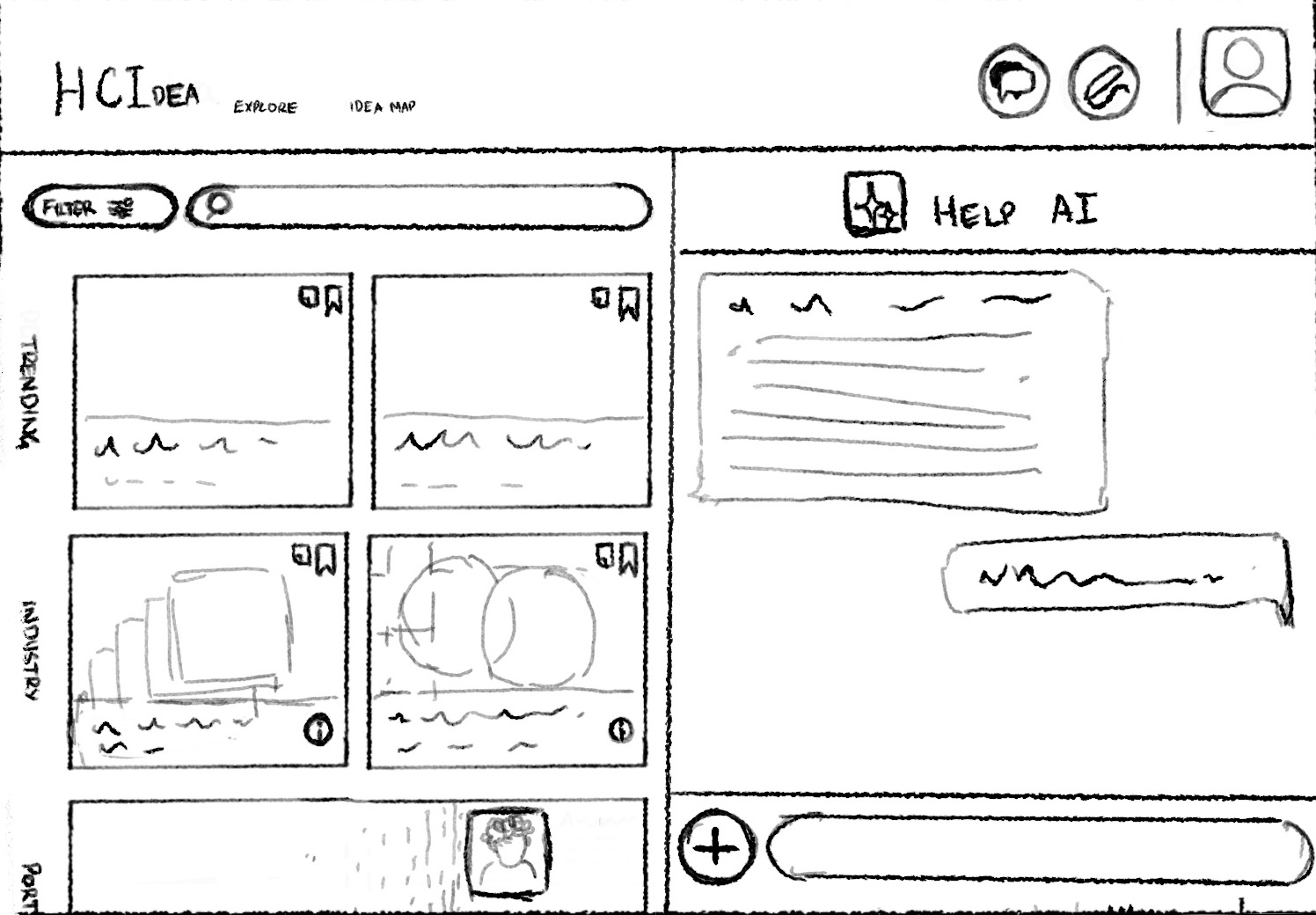
We first created a low-fidelity, clickable wireframe in POP to better visualize and test the user flows. Key pages included:

  • Explore Page: Home screen with categories (Industry Projects, Research Papers, Portfolios, Articles, Tutorials), AI chat help, messages, journal, and profile
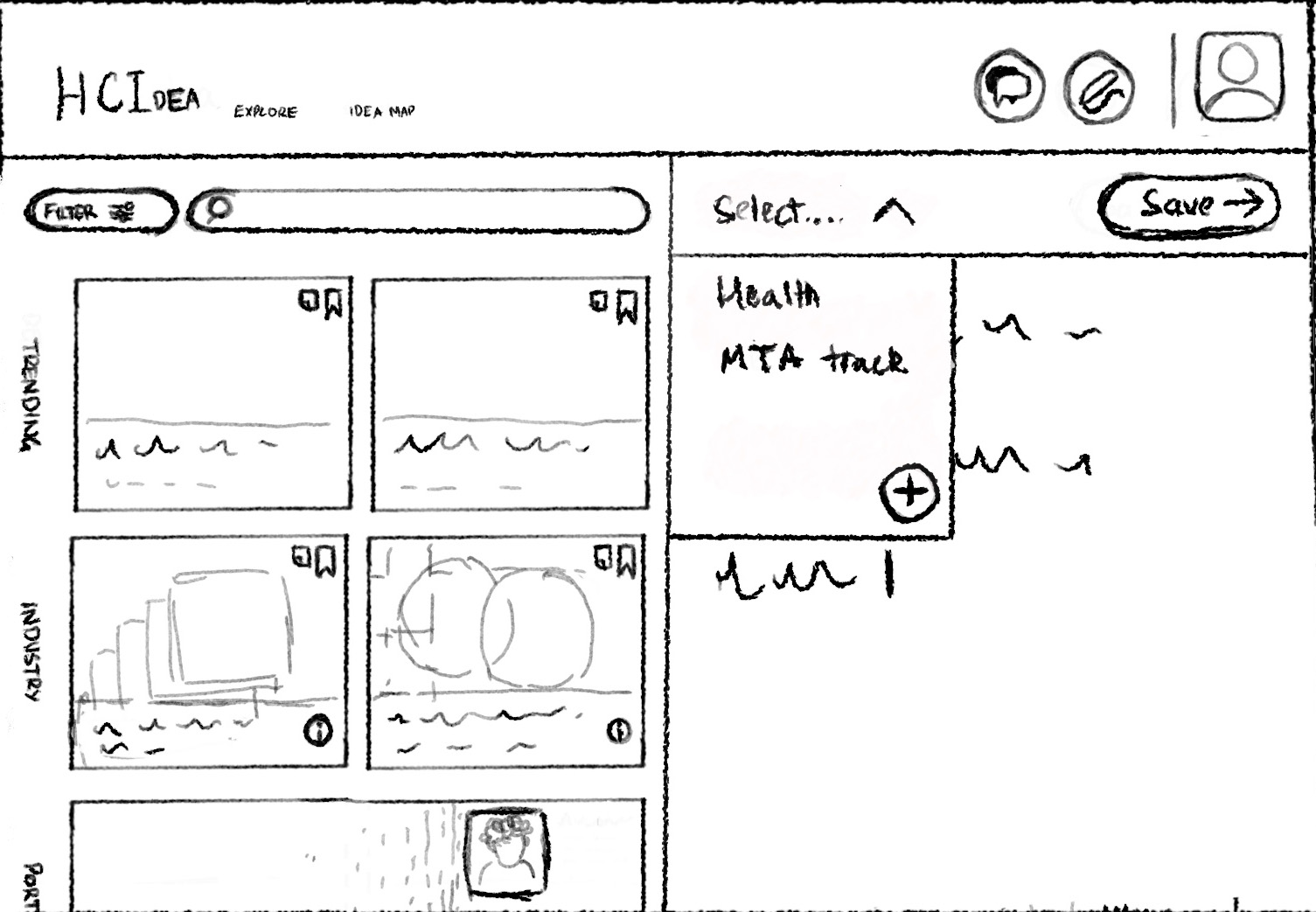
  • Idea Map Page: Visual map of bookmarked items and journal notes, automatically categorizing bookmarks and ideas while keeping them organized
  • Detail Page: Access to research papers, existing design solutions, tutorials, and other content types
  • Profile Page: Space for users to specify interests and student information, curating the explore page feed and enabling connections
  • AI Chat Sidebar: Resource for brainstorming ideas, asking design questions, and getting portfolio guidance

High-Fidelity Prototype

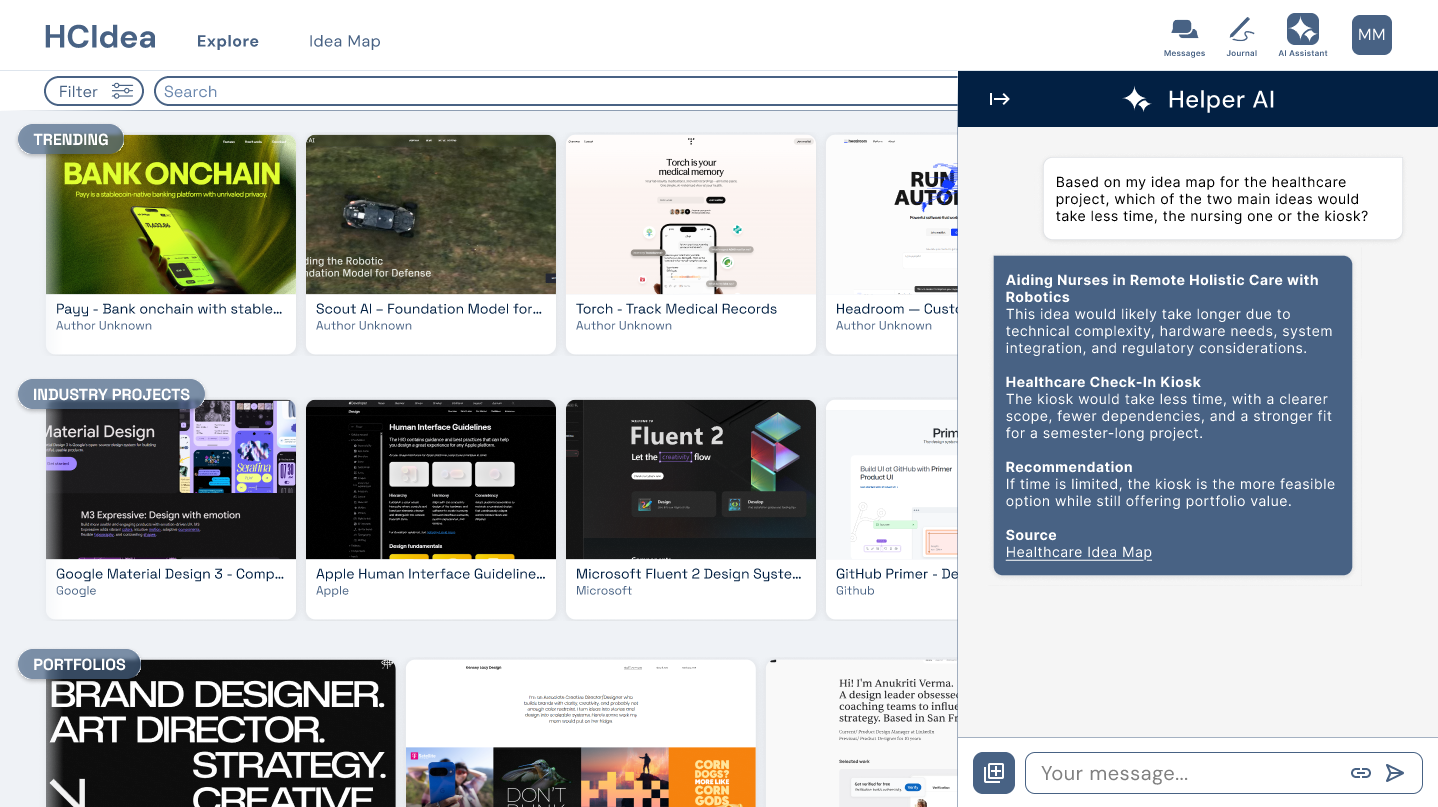
The high-fidelity prototype refined the initial concepts with improved visual design and interaction patterns. Key enhancements included:

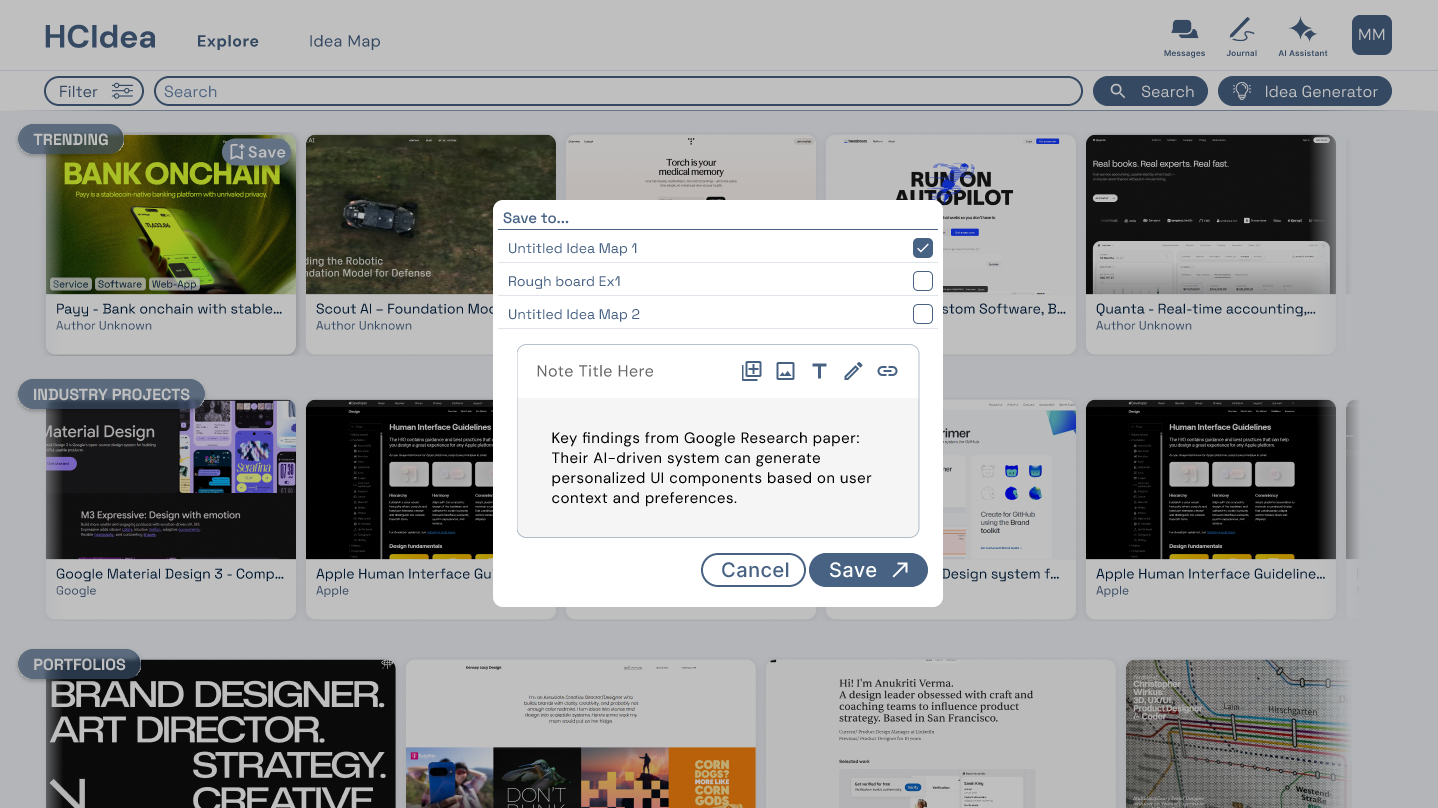
  • Detail pages changed to overlays rather than full pages for smoother navigation
  • Added task flows to the AI Chat tool for contextual assistance
  • Refined filter functionality on the explore page
  • Enhanced journal interface with idea map association
  • Improved visual hierarchy and readability
Low-Fi AI Chat
Low-Fi Pin
High-Fi AI Chat
High-Fi Pin

Usability Testing

The primary objective was to assess the learnability, efficiency, and overall user satisfaction of the core platform features with our target users. The evaluation aimed to identify specific usability issues and gather qualitative feedback to inform the next iteration.

Methodology

We recruited six (6) current HCD students, representing a mix of academic years, all familiar with the challenge of topic selection. Sessions were conducted remotely via Zoom, where participants interacted directly with a high-fidelity interactive prototype.

Participants were asked to complete seven core tasks: 1. Save an industry project to Idea Map 2. Use "I got nothing" button to generate ideas 3. Make a journal note and save to an Idea Map 4. Send a message to another user 5. Ask AI for project feasibility help 6. Share an Idea Map with another user 7. Add interests to profile

We collected quantitative metrics (task success rates, time-on-task, error counts, SUS scores) and qualitative data (think-aloud commentary, post-test interviews).

Quantitative Findings

Task Success Rates & Times:

  • Save industry project to Idea Map: 83.33% success (48 seconds avg)
  • "I got nothing" button: 66.67% success (64 seconds avg)
  • Make journal note and save: 100% success (42 seconds avg)
  • Send message to user: 100% success (24 seconds avg)
  • Ask AI for feasibility help: 83.33% success (24 seconds avg)
  • Share Idea Map: 83.33% success (37 seconds avg)
  • Add interests to profile: 66.67% success (37 seconds avg)

System Usability Scale (SUS) Score: 86.25/100

The SUS score of 86.25 strongly indicates that participants found the application highly usable, consistent, and recommendable. This excellent global assessment is supported by flawless (100%) success rates on straightforward interactions like sending messages and creating journal notes.

Qualitative Findings

Reaction to Core Concept: Participants responded positively to the platform's fundamental purpose. One participant stated, "I actually do like how everything is set up... the concept is great," and emphasized the benefit of "having a place to like, save all of it in one centralized location."

Confusion regarding the "I got nothing" button: A significant usability issue emerged with the "I got nothing" button. One participant compared it to a "Google, I feel lucky" experience, expecting it to "just throw something at you," and was puzzled when they found they had to "do a little bit more."

Issues with the Idea Map page: The core organizing principle was not intuitively grasped. One participant admitted they "[were] unsure of what an idea map is" and initially thought of it as a "mood board."

AI Feature Discoverability: Some users did not immediately think to use the AI for feasibility checks. One participant said they "wouldn't think to ask AI" and expected such metrics directly on project cards.

Navigation and Standard interactions: Tasks involving universally recognized patterns (sending messages) were completed with ease and described as "pretty straightforward" and "fairly standard."

Prototype Improvements

Following the usability evaluation, we implemented targeted refinements to address the identified usability barriers and enhance clarity, functionality, and user experience:

  • Increased Legibility: Adjusted tool icon text weight and darkened search bar text to improve readability and visual accessibility
  • Terminology Clarity: Renamed "Idea Assistant" to "AI Assistant" to better communicate the feature's purpose and align with user mental models
  • Visual Hierarchy: Adjusted opacity of section labels on the dashboard to create clearer visual hierarchy and reduce interface noise
  • Enhanced Idea Map Interface: Added more icons to the Idea Map toolbelt, making it more dynamic and intuitive for organizing and interacting with content
  • Improved Idea Generation Page: Enhanced the idea generator to ensure recommended projects dynamically follow the theme of the generated prompt
  • Clearer Content Attribution: Added visible source attribution to the Idea Map page, helping users understand the origin of ideas and research items

These updates directly respond to user feedback regarding confusion around the AI feature, conceptual clarity of the Idea Map, and overall interface polish.

Conclusion

The usability evaluation confirms that the HCIdea platform's core concept strongly resonates with Human-Centered Design students. This is evidenced by the high SUS score of 86.25. Participants validated the need for a centralized tool to support academic ideation and found the basic navigation and standard interactions to be intuitive and efficient.

However, the study also revealed critical usability barriers within several of the platform's unique features. Despite the strong overall impression, task success rates showed that key functions such as the "I got nothing" idea generator and profile editing were not completed successfully by one third of users. Qualitative data indicated that these failures came from mismatched mental models, unclear conceptual labels, and disconnected workflows.

In summary, while HCIdea's foundation is solid and its value proposition is clear, targeted refinements were necessary to ensure its specialized tools are as usable as its core framework.

Future Work

Moving forward, the following steps are recommended to further develop HCIdea:

  • Long Term Feature Expansion: Explore integration with academic databases such as IEEE Xplore and ACM Digital Library for direct access to research papers
  • Advanced Collaboration Tools: Develop real-time co-editing features for Idea Maps and shared project spaces to support synchronous teamwork
  • Personalization and Learning Pathways: Implement adaptive learning features that guide students based on skill level, project type, and career interests
  • Extended Usability Testing: Conduct follow-up testing with the refined prototype, focusing on improved AI assistant, Idea Map clarity, and new collaboration flows
  • Institutional Partnerships: Pilot the platform within HCD programs to gather longitudinal data on impact on student project outcomes, portfolio quality, and academic confidence

These future directions aim to scale HCIdea from a classroom prototype into a robust, widely adopted tool that reduces decision paralysis and empowers the next generation of human-centered designers.

HCIdea

HCIdea

UX ideation platform for HCD students

Project Overview

Our project's primary audience is Human-Centered Design (HCD) students, addressing some of the difficulty that comes with generating an idea and choosing topics for projects. The goal of this project was to design a digital platform that reduces decision paralysis and aids students in choosing feasible and relevant research topics.

Research was conducted with current and former HCD students to gain a better understanding of the experience and identify areas of improvement through design. After sending out a survey and conducting interviews to gain insights, we performed qualitative analysis on responses and built a solution. Once the prototype was built, we tested on users for feedback, implemented changes, and created this report.

Team: Andrew Dinspechin, Lindsey Fortier, Apoorv Singh | Course: Intro to UX | Date: December 17, 2025

HCIdea Platform Overview

Problem Statement

With HCD students being early in their design journey, many often struggle to identify research topics for assignments and group projects. Throughout the course of the degree, it is often a class requirement to generate ideas for research and work in teams. Since students are just starting to learn the principles of design, it can be difficult to know where to start or how to build a strong foundation.

Key challenges identified:

  • Many common problems already have existing solutions, making it harder to generate truly novel ideas
  • Problem spaces have 'shrunk', becoming more nuanced and increasingly difficult to ideate for
  • Students typically aim to secure roles in industry or continue into academic research
  • Building strong portfolios, developing versatile skill sets, and forming professional connections are key factors for success

The uncertainty around project direction can cause indecision and frustration, leading to inefficient time management early in the process. With regard to group projects, these challenges are often amplified when trying to attain consensus on a project's direction, demonstrating a clear need for an organized ideation system.

Proposed Solution

We proposed a digital platform, titled 'HCIdea', designed to help HCD students discover and refine research topics for academic and portfolio projects. The platform serves as both an idea generator and research library, aggregating existing publications, case studies, and design examples based on the user's interests or team focus.

Key platform features:

  • Idea Generation Hub: Browse existing design examples, industry-sponsored projects, and personalized content recommendations with built-in prompts for brainstorming sessions
  • Research Analysis & Aggregation: AI-powered synthesis of complex information, creating connection points between related research with centralized idea maps
  • UX Project Guidance: AI assistant that helps assess feasibility and novelty of research ideas, identify technical constraints, and provide brainstorming support
  • Community Connection: Student profiles highlighting research interests to foster peer-to-peer networking and simplify finding compatible project partners
  • Search & Categorization: Smart search tools that filter by industry trends, tags, and personal interests, surfacing different types of data in an intuitive format

By presenting related design solutions, the system assists in highlighting gaps in under-researched opportunities, helping students identify areas with potential for meaningful exploration.

User Research

We conducted user research to better understand the needs of design students during the ideation and discovery phase of their projects. To build empathy and understand users better, we distributed a survey and conducted user interviews.

Methodology:

  • Survey: Distributed a mixed-methods survey of 11 questions to establish baseline understanding of HCD students, capturing challenges with product ideation, gaps in UX knowledge, and potential issues when forming teams
  • User Interviews: Conducted 20-minute unstructured interviews to gain deeper insight into students' thought processes in the context of ideation, understanding pain points, needs, wants, and motivations in more depth

Participant criteria included current and former students in HCD, Human-Computer Interaction (HCI), User Experience Design (UX), or related fields, as well as individuals who have worked on assignments requiring project idea generation either individually or in teams.

Survey Demographics

  • 77.78% of participants were current or former HCD students
  • 9 survey participants total
  • 5 follow-up user interviews conducted

Key Insights

Our analysis revealed several critical insights about HCD students' ideation challenges:

Idea Generation and Novelty: 77.78% of participants were neutral or found it easy to come up with an idea for a project. However, generating ideas that are truly novel proved more difficult with 77.78% reporting that coming up with something new or original is 'somewhat' or 'very' challenging. This highlights a common struggle to create ideas that feel distinctive in a saturated problem space.

Uncertainty Around Feasibility and Direction: Time constraints and project feasibility were identified as some of the most common problems when generating ideas. Students often struggle to estimate the scope of projects within a semester, making it difficult to manage their time effectively.

Gaps in UX Knowledge and Process Understanding: With many students being early in their design career, understanding design principles and terminology is a common challenge with 88.89% reporting difficulty in this area. 77.78% participants noted the importance of considering their portfolio when selecting an idea, suggesting students understand the value but may not understand the principles needed to achieve it.

Desire for Tools to Support Research and Ideation: Participants expressed strong interest in AI-powered tools to automate research and ideation. Students currently use a variety of platforms: Google for research, Quora for perspectives, ChatGPT for brainstorming, Behance for inspiration, Miro for collaboration, and Figma for prototyping - highlighting an opportunity to streamline these functions.

Teamwork and Collaboration Challenges: 66.67% participants reported difficulty finding fellow researchers or designers to work with. Indecision, lack of communication, and differences in personal interest were ranked highest among sources of friction between teammates.
User Personas

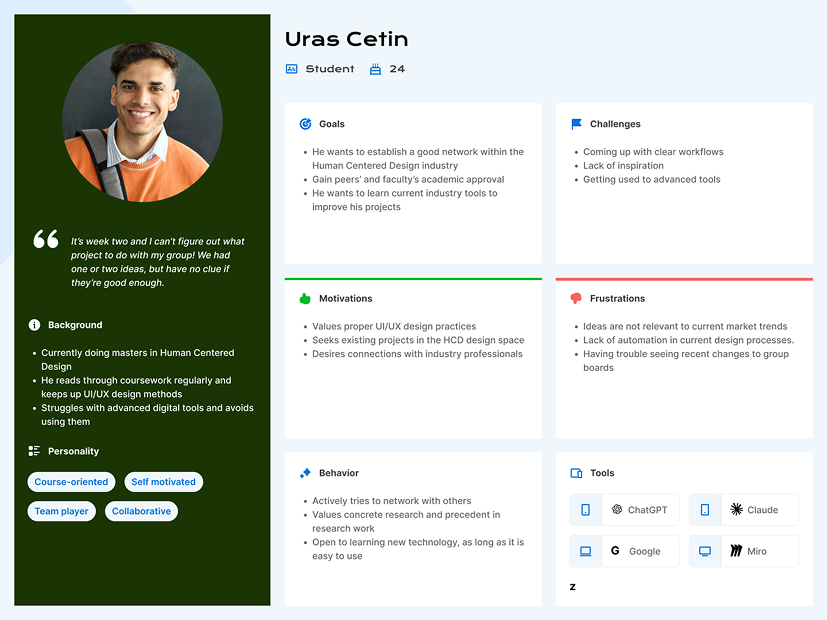
Based on our research insights, we developed two primary user personas to guide our design decisions.

User Persona 1 - The Ambitious Student
User Persona 2 - The Collaborative Learner

Prototype Development

After analyzing the interview and survey data, we conducted an affinity mapping exercise to identify key themes. The team then collaborated and brainstormed features based on what we had learned. We mapped out the user journey and prioritized features for the MVP.

Low-Fidelity Prototype

We first created a low-fidelity, clickable wireframe in POP to better visualize and test the user flows. Key pages included:

  • Explore Page: Home screen with categories (Industry Projects, Research Papers, Portfolios, Articles, Tutorials), AI chat help, messages, journal, and profile
  • Idea Map Page: Visual map of bookmarked items and journal notes, automatically categorizing bookmarks and ideas while keeping them organized
  • Detail Page: Access to research papers, existing design solutions, tutorials, and other content types
  • Profile Page: Space for users to specify interests and student information, curating the explore page feed and enabling connections
  • AI Chat Sidebar: Resource for brainstorming ideas, asking design questions, and getting portfolio guidance

High-Fidelity Prototype

The high-fidelity prototype refined the initial concepts with improved visual design and interaction patterns. Key enhancements included:

  • Detail pages changed to overlays rather than full pages for smoother navigation
  • Added task flows to the AI Chat tool for contextual assistance
  • Refined filter functionality on the explore page
  • Enhanced journal interface with idea map association
  • Improved visual hierarchy and readability
Low-Fi AI Chat
Low-Fi Pin
High-Fi AI Chat
High-Fi Pin

Usability Testing

The primary objective was to assess the learnability, efficiency, and overall user satisfaction of the core platform features with our target users. The evaluation aimed to identify specific usability issues and gather qualitative feedback to inform the next iteration.

Methodology

We recruited six (6) current HCD students, representing a mix of academic years, all familiar with the challenge of topic selection. Sessions were conducted remotely via Zoom, where participants interacted directly with a high-fidelity interactive prototype.

Participants were asked to complete seven core tasks: 1. Save an industry project to Idea Map 2. Use "I got nothing" button to generate ideas 3. Make a journal note and save to an Idea Map 4. Send a message to another user 5. Ask AI for project feasibility help 6. Share an Idea Map with another user 7. Add interests to profile

We collected quantitative metrics (task success rates, time-on-task, error counts, SUS scores) and qualitative data (think-aloud commentary, post-test interviews).

Quantitative Findings

Task Success Rates & Times:

  • Save industry project to Idea Map: 83.33% success (48 seconds avg)
  • "I got nothing" button: 66.67% success (64 seconds avg)
  • Make journal note and save: 100% success (42 seconds avg)
  • Send message to user: 100% success (24 seconds avg)
  • Ask AI for feasibility help: 83.33% success (24 seconds avg)
  • Share Idea Map: 83.33% success (37 seconds avg)
  • Add interests to profile: 66.67% success (37 seconds avg)

System Usability Scale (SUS) Score: 86.25/100

The SUS score of 86.25 strongly indicates that participants found the application highly usable, consistent, and recommendable. This excellent global assessment is supported by flawless (100%) success rates on straightforward interactions like sending messages and creating journal notes.

Qualitative Findings

Reaction to Core Concept: Participants responded positively to the platform's fundamental purpose. One participant stated, "I actually do like how everything is set up... the concept is great," and emphasized the benefit of "having a place to like, save all of it in one centralized location."

Confusion regarding the "I got nothing" button: A significant usability issue emerged with the "I got nothing" button. One participant compared it to a "Google, I feel lucky" experience, expecting it to "just throw something at you," and was puzzled when they found they had to "do a little bit more."

Issues with the Idea Map page: The core organizing principle was not intuitively grasped. One participant admitted they "[were] unsure of what an idea map is" and initially thought of it as a "mood board."

AI Feature Discoverability: Some users did not immediately think to use the AI for feasibility checks. One participant said they "wouldn't think to ask AI" and expected such metrics directly on project cards.

Navigation and Standard interactions: Tasks involving universally recognized patterns (sending messages) were completed with ease and described as "pretty straightforward" and "fairly standard."

Prototype Improvements

Following the usability evaluation, we implemented targeted refinements to address the identified usability barriers and enhance clarity, functionality, and user experience:

  • Increased Legibility: Adjusted tool icon text weight and darkened search bar text to improve readability and visual accessibility
  • Terminology Clarity: Renamed "Idea Assistant" to "AI Assistant" to better communicate the feature's purpose and align with user mental models
  • Visual Hierarchy: Adjusted opacity of section labels on the dashboard to create clearer visual hierarchy and reduce interface noise
  • Enhanced Idea Map Interface: Added more icons to the Idea Map toolbelt, making it more dynamic and intuitive for organizing and interacting with content
  • Improved Idea Generation Page: Enhanced the idea generator to ensure recommended projects dynamically follow the theme of the generated prompt
  • Clearer Content Attribution: Added visible source attribution to the Idea Map page, helping users understand the origin of ideas and research items

These updates directly respond to user feedback regarding confusion around the AI feature, conceptual clarity of the Idea Map, and overall interface polish.

Conclusion

The usability evaluation confirms that the HCIdea platform's core concept strongly resonates with Human-Centered Design students. This is evidenced by the high SUS score of 86.25. Participants validated the need for a centralized tool to support academic ideation and found the basic navigation and standard interactions to be intuitive and efficient.

However, the study also revealed critical usability barriers within several of the platform's unique features. Despite the strong overall impression, task success rates showed that key functions such as the "I got nothing" idea generator and profile editing were not completed successfully by one third of users. Qualitative data indicated that these failures came from mismatched mental models, unclear conceptual labels, and disconnected workflows.

In summary, while HCIdea's foundation is solid and its value proposition is clear, targeted refinements were necessary to ensure its specialized tools are as usable as its core framework.

Future Work

Moving forward, the following steps are recommended to further develop HCIdea:

  • Long Term Feature Expansion: Explore integration with academic databases such as IEEE Xplore and ACM Digital Library for direct access to research papers
  • Advanced Collaboration Tools: Develop real-time co-editing features for Idea Maps and shared project spaces to support synchronous teamwork
  • Personalization and Learning Pathways: Implement adaptive learning features that guide students based on skill level, project type, and career interests
  • Extended Usability Testing: Conduct follow-up testing with the refined prototype, focusing on improved AI assistant, Idea Map clarity, and new collaboration flows
  • Institutional Partnerships: Pilot the platform within HCD programs to gather longitudinal data on impact on student project outcomes, portfolio quality, and academic confidence

These future directions aim to scale HCIdea from a classroom prototype into a robust, widely adopted tool that reduces decision paralysis and empowers the next generation of human-centered designers.