Back
CitySense

CitySense

A civic transparency platform for visualizing underground infrastructure and building public trust.

Project Overview

As cities modernize by moving utility infrastructure underground into utilidor systems, a critical challenge arises. The invisibility of these systems erodes public awareness, trust, and connection to civic maintenance.

Through generative research with New York City residents, we identified a strong desire for:

  • Transparent, real-time communication about underground work
  • Recognition of the workers involved
  • Accessible visualization of complex infrastructure
  • Actionable information for daily decision-making

In response, we designed and developed CitySense, a civic transparency platform comprising a mobile app and physical street installations. CitySense provides real-time visibility into utility health, an interactive underground map, issue reporting, and worker profiles.

  • Key contributions of this research:
  • A novel civic transparency platform bridging the visibility gap in smart city infrastructure
  • Empirical findings from a 10-day longitudinal field study on user engagement with transparency tools
  • Actionable design implications for fostering public trust through human-centered civic technology
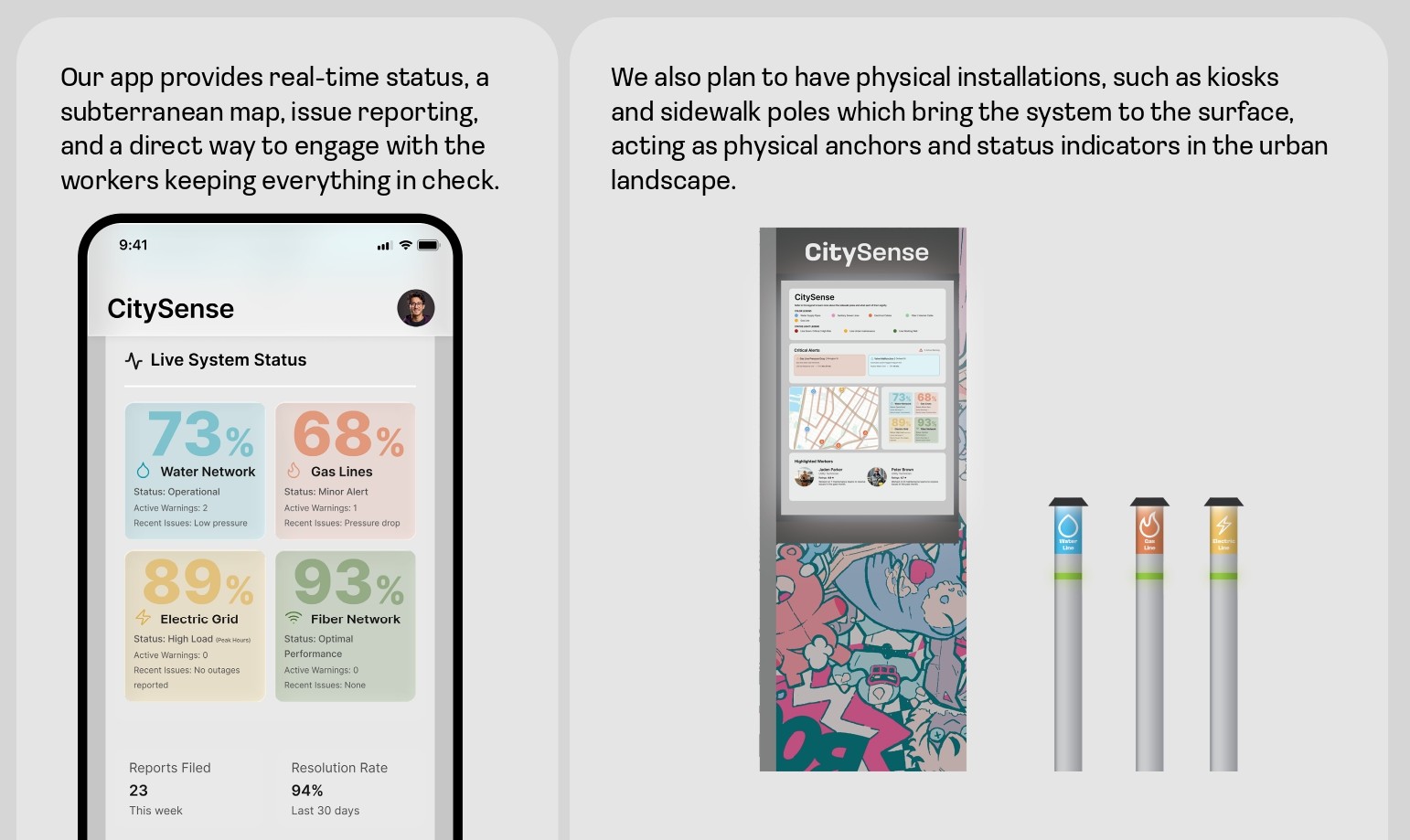
CitySense Platform Overview

Generative Research

To ground our design in lived experiences, we first conducted a generative research study with five diverse New York City residents. Methods included semi-structured interviews and a participatory design activity where participants ranked utility metrics for a public display.

Key Findings & Design Opportunities:

Our analysis revealed four key findings that directly informed our design:

  • Trust Deficit: Participants expressed skepticism about municipal execution and maintenance. Transparency tools must communicate system integrity and governmental accountability to be effective.
  • Desire for Simplicity: Across tech-savvy and non-tech users, there was a strong preference for clear, concise, and visual information - not raw data or complex dashboards.
  • Human Connection: The invisibility of workers was a recurring concern. Participants felt that recognizing labor would build empathy and trust.
  • Actionable Awareness: Information needed to be localized and timely to aid daily decision-making, such as commute routing or business planning.

Platform Design

CitySense is a multi-channel transparency platform consisting of a mobile application and complementary physical installations.

Core Application Features:

  • Dashboard: The home screen provides an overview of "Critical Alerts" and "Recent Works" near the user, with color-coded statuses based on the utility type.
  • Interactive Map & Legend: A toggle reveals the underground utilidor network, color-coded by utility type (water, gas, electricity, etc.). "Trouble pins" indicate disruptions, with detailed impact reports available on tap.
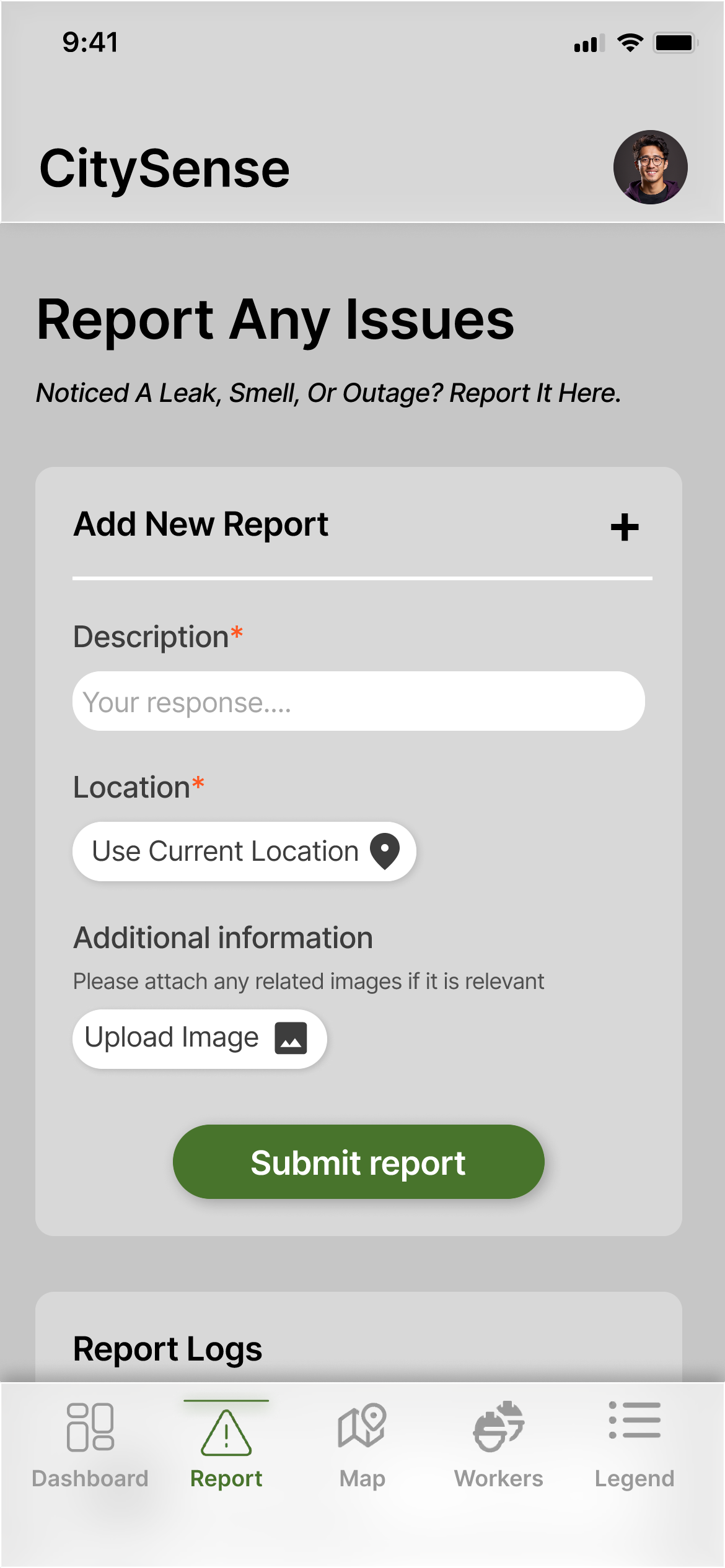
  • Report Tool: Allows users to report issues (leaks, outages) with description, location, and photo upload. A "Report Log" provides status updates on past submissions.
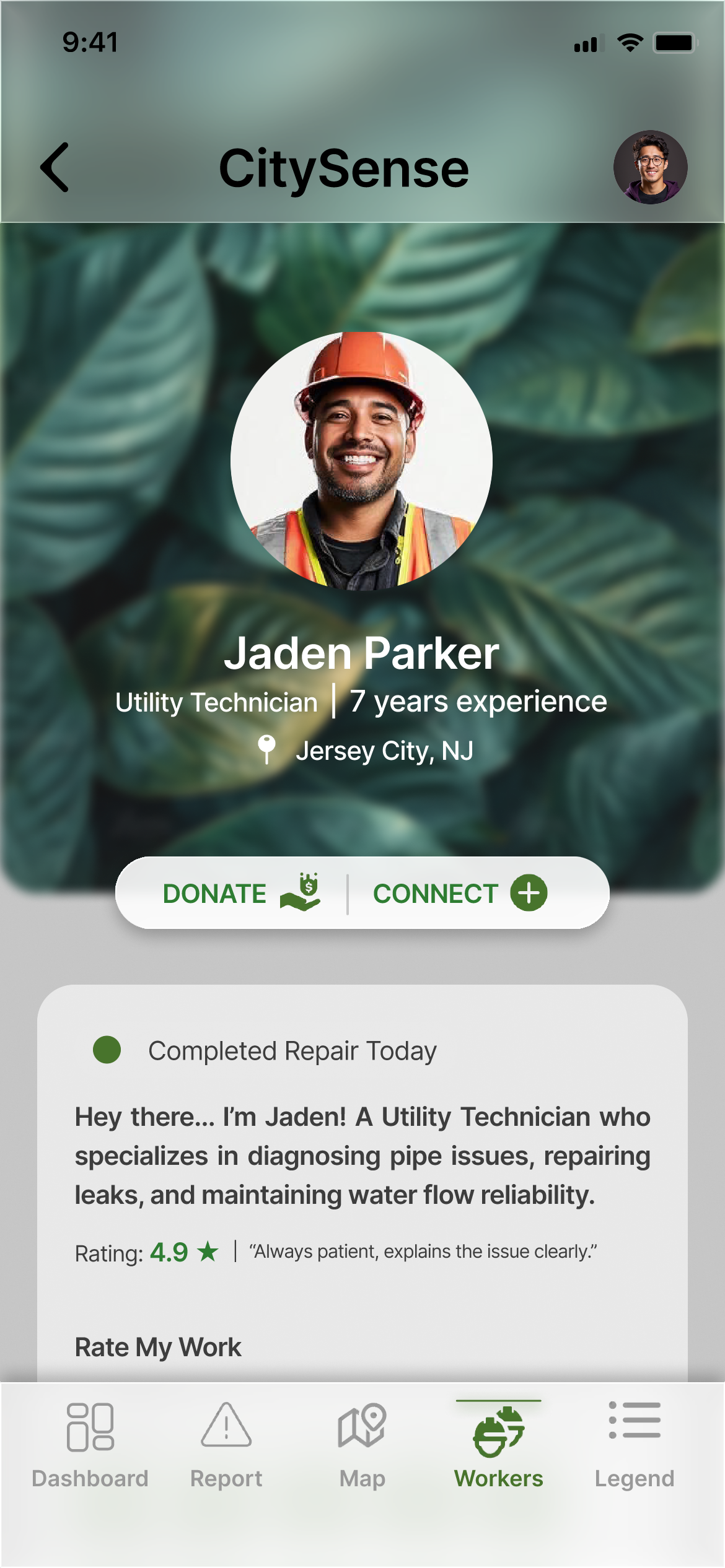
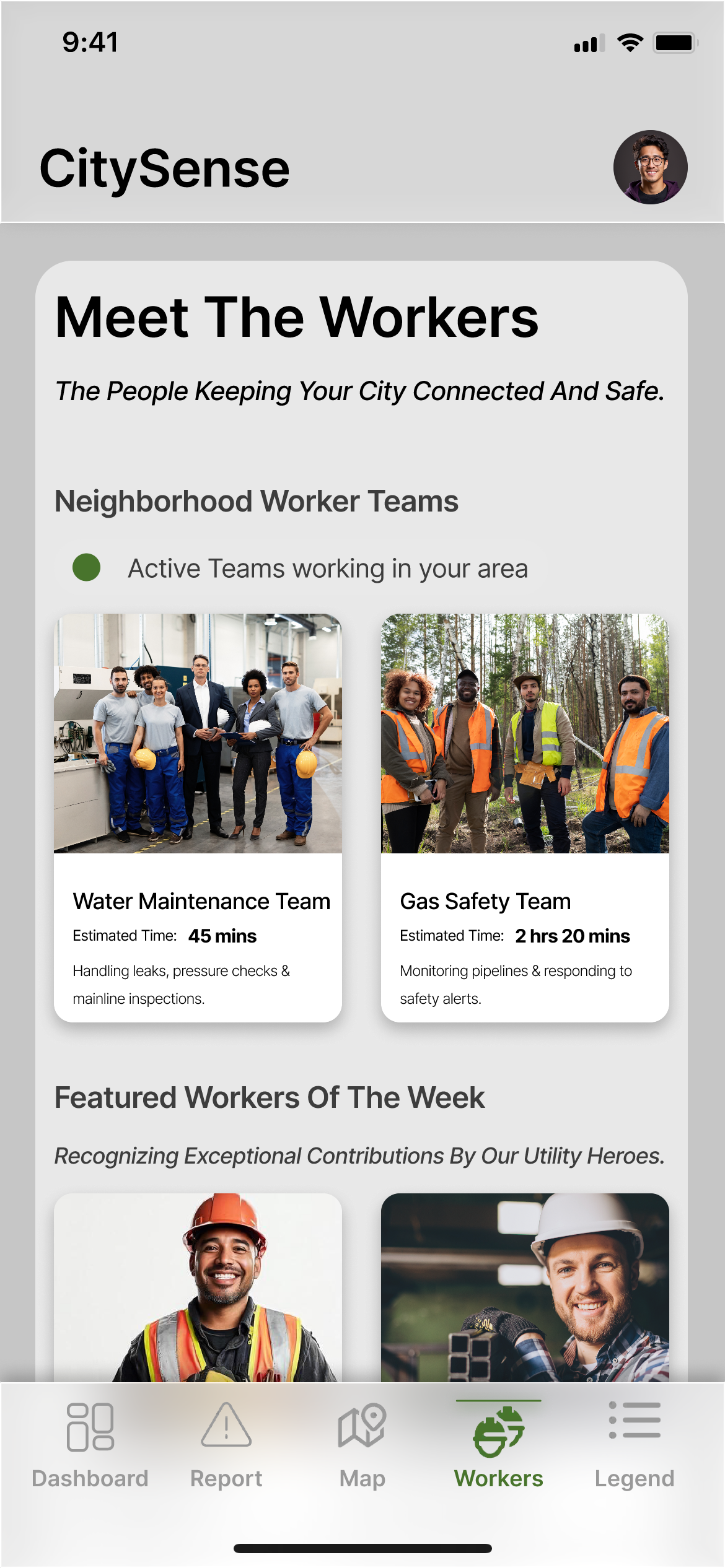
  • Workers Page: Features profiles of utility teams and individual technicians, with options to "Connect" (send appreciation) or "Donate" (offer financial support).
  • Physical Installations: Street-side kiosks display maps and alerts. Color-coded utility poles with status lights provide at-a-glance awareness: green for working, yellow for maintenance, red for line down.
Dashboard Design
Interactive Map
Report Tool
Worker Profile

Field Study

We conducted a 10-day longitudinal field study with 10 participants (6 male, 4 female) aged 22 to 46, comprising 9 NYC residents and 1 business owner. Participants represented key user groups: daily commuters, delivery drivers, students, and small business owners.

Methodology: The study employed a mixed-methods approach:

  • Daily Guided Tasks: Over 10 days, participants completed specific tasks (explore dashboard, report issues, use map) and submitted reports on their experience.
  • Instrumented Logging: We tracked page views and navigation paths within the prototype.
  • Post-Study Interviews: Semi-structured interviews gathered in-depth feedback on overall experience and perceived usefulness.
  • Daily Task List:
  • Day 1 - Explore Dashboard
  • Day 2 - Inspect a critical alert
  • Day 3 - Report an issue
  • Day 4 - Explore the Map and Legend
  • Day 5 - Check information for highlighted areas
  • Day 6 - Explore workers page
  • Day 7 - View worker profile
  • Day 8 - Try donation feature
  • Day 9 - Connect with worker
  • Day 10 - Submit another report

Key Findings

Quantitative Findings

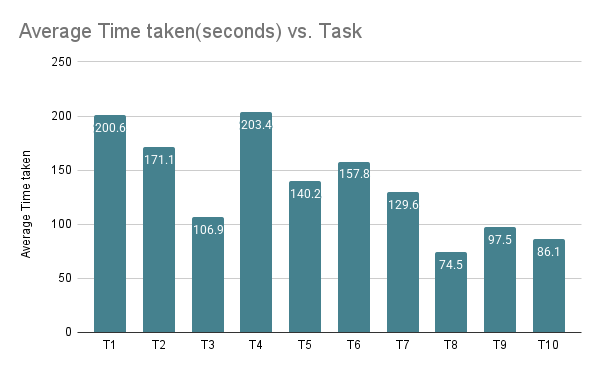
Task Completion Time: Initial exploration tasks (Days 1 and 4) took the longest (average 200-203 seconds), indicating a learning curve. Later, goal-directed tasks were completed much faster (average 75-86 seconds), suggesting that core flows became efficient with familiarity.

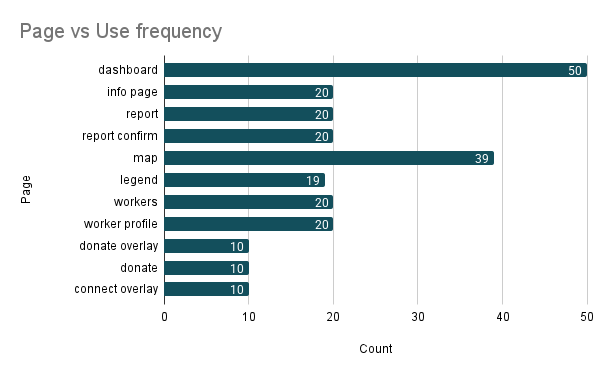
Page Engagement: The Dashboard (50 visits) and Map (39 visits) were the most frequently accessed features, establishing them as primary information hubs. The Donate and Connect features had fewest visits (10 each), indicating low organic engagement with social features.

Qualitative Themes

1. Transparency is Valued, but Clarity is Crucial: Participants praised the app's mission. One noted, "It's cool to finally see what's underneath all the construction." However, ambiguous UI elements like "Predictive Insights" and unlabeled progress bars caused confusion.

2. The Map is Engaging but Not Yet Actionable: The interactive map was described as "fascinating" but users struggled to translate engagement into practical use. One participant remarked, "I love seeing the lines, but what do I do if one is red near my house?"

3. Social Features Feel Detached: Worker profiles were highly effective at building trust. "Putting a face to it makes it feel more reliable," stated one user. Yet, Donate and Connect features felt isolated.

4. Demand for Personalization and Filtering: Users requested tools to manage information overload. A business owner said, "I don't care about the water main in Queens. Let me filter just my block and just power outages."

Study Participants

  • P1: 22 - Student
  • P2: 22 - Part time worker, Student
  • P3: 23 - Part time worker, Student
  • P4: 25 - Full time worker
  • P5: 28 - Full time worker
  • P6: 24 - Full time worker
  • P7: 43 - Full time worker
  • P8: 31 - Full time worker
  • P9: 29 - Full time worker
  • P10: 42 - Business Owner
Task Completion Time Graph
Page Engagement Chart

Design Implications

Our field study yielded three key design implications for civic transparency platforms:

Prioritize Interpretive Clarity Over Raw Data Display: Ambiguous metrics and jargon create "transparency theater." Designers should employ plain language, clear legends, and tooltips to ensure every data point is intuitively understood. For example, instead of "Predictive Insights," use "Expected Impact on Your Commute."

Embed Social and Participatory Features into Core Flows: Social features like donations or messages should not be siloed. They should be triggered contextually. For instance, after a user sees a "Work Completed" alert, the app could suggest "Thank the crew who fixed this?" This ties community engagement directly to tangible system outcomes.

Enable Personalized, Hyper-Local Views: A one-size-fits-all data dump is overwhelming. Providing user-controlled filters (by location, utility type, severity) and personalized alerts (e.g., "affects your commute route") transforms a generic transparency tool into a personally indispensable utility.

Future Work

Based on participant suggestions, we plan to explore:

  • Augmented Reality (AR) map view allowing users to point their camera at the street to see an overlay of underlying utilities
  • Implementation of filtering and personalization systems
  • Longer-term deployment with larger, more diverse user groups
  • Integration with municipal backend systems for real-time data

Conclusion

CitySense demonstrates the potential of civic technology to bridge the growing gap between complex smart city infrastructure and public understanding. Our generative research revealed a deep-seated need for simplicity, accountability, and human connection. The longitudinal field study confirmed that while the vision of transparency resonates strongly, its execution must be meticulously crafted to be clear, actionable, and personally relevant.

The lessons from CitySense extend beyond utilidors. Any system aiming to make institutional processes transparent must design for interpretability, integrate community feedback loops meaningfully, and prioritize the user's context. By doing so, HCI researchers and designers can help build not just smarter cities, but more trustworthy and engaged communities.

Team: Apoorv Singh, Salomi Vaibhav Pradhan, Yuliya Semikina, Abdul Khadar Shaik | Institution: Pace University, New York | Course: IS 628 Research Methods for UX

CitySense

CitySense

Civic transparency platform for underground infrastructure visualization

Project Overview

As cities modernize by moving utility infrastructure underground into utilidor systems, a critical challenge arises. The invisibility of these systems erodes public awareness, trust, and connection to civic maintenance.

Through generative research with New York City residents, we identified a strong desire for:

  • Transparent, real-time communication about underground work
  • Recognition of the workers involved
  • Accessible visualization of complex infrastructure
  • Actionable information for daily decision-making

In response, we designed and developed CitySense, a civic transparency platform comprising a mobile app and physical street installations. CitySense provides real-time visibility into utility health, an interactive underground map, issue reporting, and worker profiles.

  • Key contributions of this research:
  • A novel civic transparency platform bridging the visibility gap in smart city infrastructure
  • Empirical findings from a 10-day longitudinal field study on user engagement with transparency tools
  • Actionable design implications for fostering public trust through human-centered civic technology
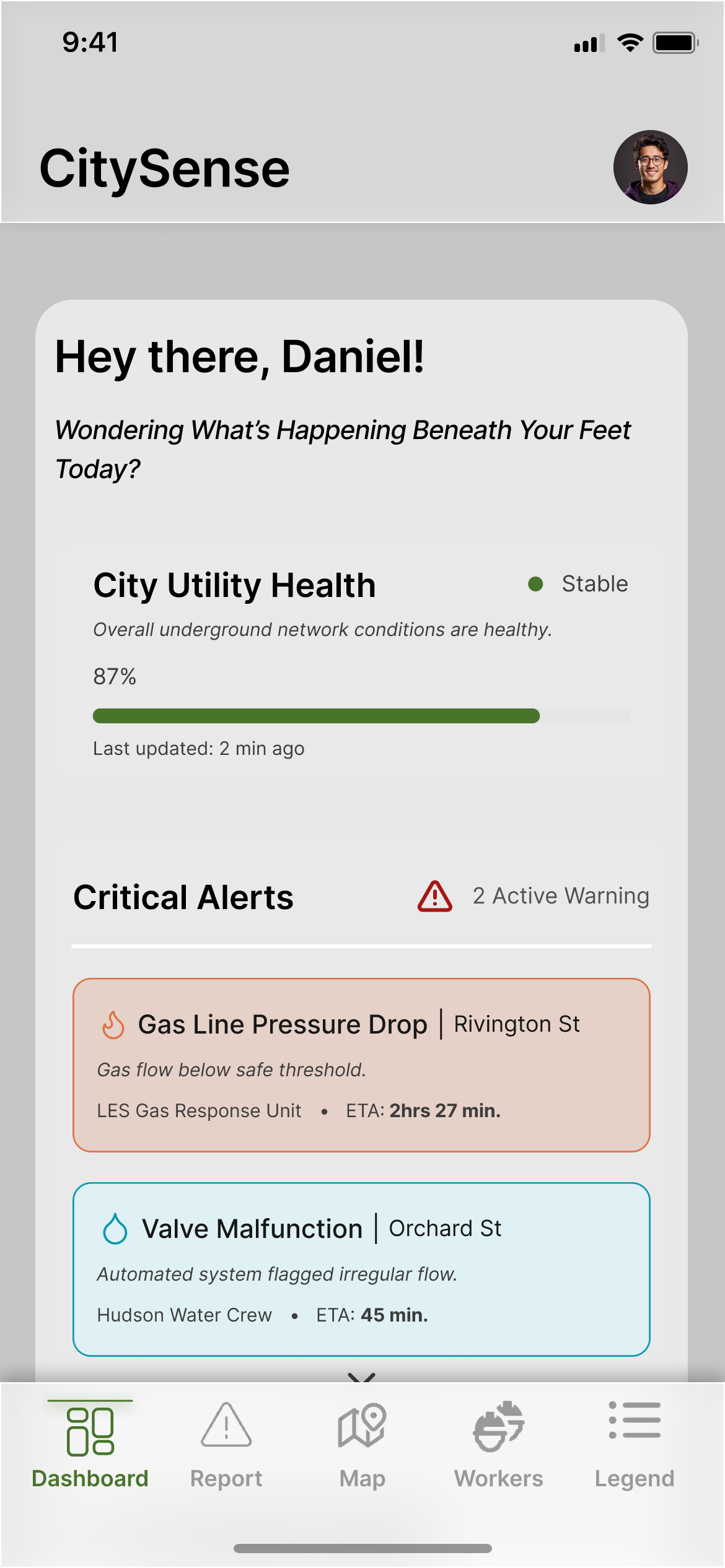
CitySense Platform Overview

Generative Research

To ground our design in lived experiences, we first conducted a generative research study with five diverse New York City residents. Methods included semi-structured interviews and a participatory design activity where participants ranked utility metrics for a public display.

Key Findings & Design Opportunities:

Our analysis revealed four key findings that directly informed our design:

  • Trust Deficit: Participants expressed skepticism about municipal execution and maintenance. Transparency tools must communicate system integrity and governmental accountability to be effective.
  • Desire for Simplicity: Across tech-savvy and non-tech users, there was a strong preference for clear, concise, and visual information - not raw data or complex dashboards.
  • Human Connection: The invisibility of workers was a recurring concern. Participants felt that recognizing labor would build empathy and trust.
  • Actionable Awareness: Information needed to be localized and timely to aid daily decision-making, such as commute routing or business planning.

Platform Design

CitySense is a multi-channel transparency platform consisting of a mobile application and complementary physical installations.

Core Application Features:

  • Dashboard: The home screen provides an overview of "Critical Alerts" and "Recent Works" near the user, with color-coded statuses based on the utility type.
  • Interactive Map & Legend: A toggle reveals the underground utilidor network, color-coded by utility type (water, gas, electricity, etc.). "Trouble pins" indicate disruptions, with detailed impact reports available on tap.
  • Report Tool: Allows users to report issues (leaks, outages) with description, location, and photo upload. A "Report Log" provides status updates on past submissions.
  • Workers Page: Features profiles of utility teams and individual technicians, with options to "Connect" (send appreciation) or "Donate" (offer financial support).
  • Physical Installations: Street-side kiosks display maps and alerts. Color-coded utility poles with status lights provide at-a-glance awareness: green for working, yellow for maintenance, red for line down.
Dashboard Design
Interactive Map
Report Tool
Worker Profile

Field Study

We conducted a 10-day longitudinal field study with 10 participants (6 male, 4 female) aged 22 to 46, comprising 9 NYC residents and 1 business owner. Participants represented key user groups: daily commuters, delivery drivers, students, and small business owners.

Methodology: The study employed a mixed-methods approach:

  • Daily Guided Tasks: Over 10 days, participants completed specific tasks (explore dashboard, report issues, use map) and submitted reports on their experience.
  • Instrumented Logging: We tracked page views and navigation paths within the prototype.
  • Post-Study Interviews: Semi-structured interviews gathered in-depth feedback on overall experience and perceived usefulness.
  • Daily Task List:
  • Day 1 - Explore Dashboard
  • Day 2 - Inspect a critical alert
  • Day 3 - Report an issue
  • Day 4 - Explore the Map and Legend
  • Day 5 - Check information for highlighted areas
  • Day 6 - Explore workers page
  • Day 7 - View worker profile
  • Day 8 - Try donation feature
  • Day 9 - Connect with worker
  • Day 10 - Submit another report

Key Findings

Quantitative Findings

Task Completion Time: Initial exploration tasks (Days 1 and 4) took the longest (average 200-203 seconds), indicating a learning curve. Later, goal-directed tasks were completed much faster (average 75-86 seconds), suggesting that core flows became efficient with familiarity.

Page Engagement: The Dashboard (50 visits) and Map (39 visits) were the most frequently accessed features, establishing them as primary information hubs. The Donate and Connect features had fewest visits (10 each), indicating low organic engagement with social features.

Qualitative Themes

1. Transparency is Valued, but Clarity is Crucial: Participants praised the app's mission. One noted, "It's cool to finally see what's underneath all the construction." However, ambiguous UI elements like "Predictive Insights" and unlabeled progress bars caused confusion.

2. The Map is Engaging but Not Yet Actionable: The interactive map was described as "fascinating" but users struggled to translate engagement into practical use. One participant remarked, "I love seeing the lines, but what do I do if one is red near my house?"

3. Social Features Feel Detached: Worker profiles were highly effective at building trust. "Putting a face to it makes it feel more reliable," stated one user. Yet, Donate and Connect features felt isolated.

4. Demand for Personalization and Filtering: Users requested tools to manage information overload. A business owner said, "I don't care about the water main in Queens. Let me filter just my block and just power outages."

Study Participants

  • P1: 22 - Student
  • P2: 22 - Part time worker, Student
  • P3: 23 - Part time worker, Student
  • P4: 25 - Full time worker
  • P5: 28 - Full time worker
  • P6: 24 - Full time worker
  • P7: 43 - Full time worker
  • P8: 31 - Full time worker
  • P9: 29 - Full time worker
  • P10: 42 - Business Owner
Task Completion Time Graph
Page Engagement Chart

Design Implications

Our field study yielded three key design implications for civic transparency platforms:

Prioritize Interpretive Clarity Over Raw Data Display: Ambiguous metrics and jargon create "transparency theater." Designers should employ plain language, clear legends, and tooltips to ensure every data point is intuitively understood. For example, instead of "Predictive Insights," use "Expected Impact on Your Commute."

Embed Social and Participatory Features into Core Flows: Social features like donations or messages should not be siloed. They should be triggered contextually. For instance, after a user sees a "Work Completed" alert, the app could suggest "Thank the crew who fixed this?" This ties community engagement directly to tangible system outcomes.

Enable Personalized, Hyper-Local Views: A one-size-fits-all data dump is overwhelming. Providing user-controlled filters (by location, utility type, severity) and personalized alerts (e.g., "affects your commute route") transforms a generic transparency tool into a personally indispensable utility.

Future Work

Based on participant suggestions, we plan to explore:

  • Augmented Reality (AR) map view allowing users to point their camera at the street to see an overlay of underlying utilities
  • Implementation of filtering and personalization systems
  • Longer-term deployment with larger, more diverse user groups
  • Integration with municipal backend systems for real-time data

Conclusion

CitySense demonstrates the potential of civic technology to bridge the growing gap between complex smart city infrastructure and public understanding. Our generative research revealed a deep-seated need for simplicity, accountability, and human connection. The longitudinal field study confirmed that while the vision of transparency resonates strongly, its execution must be meticulously crafted to be clear, actionable, and personally relevant.

The lessons from CitySense extend beyond utilidors. Any system aiming to make institutional processes transparent must design for interpretability, integrate community feedback loops meaningfully, and prioritize the user's context. By doing so, HCI researchers and designers can help build not just smarter cities, but more trustworthy and engaged communities.

Team: Apoorv Singh, Salomi Vaibhav Pradhan, Yuliya Semikina, Abdul Khadar Shaik | Institution: Pace University, New York | Course: IS 628 Research Methods for UX